

Invoice in 30 seconds. Get paid before you drive away.
Most handymen spend 20+ minutes on invoices — and then days chasing payment. TX2Pay takes 30 seconds from your phone and sends the payment link automatically. Most customers pay before you're off the driveway. Free forever.
Setup in 2 minutes · No credit card · Cancel anytime
“I used to spend days following up on small jobs — texting, calling, waiting for checks. Now I send the invoice when I'm done and most customers pay before I get to my next call.”
Jordan P.
Owner · Quick Fix Handyman
The invoicing problems every handyman knows
TX2Pay is built to solve exactly these.
Small jobs that aren't worth chasing for payment
A $150 repair shouldn't require three follow-up texts to collect. TX2Pay's payment link gets small jobs paid on the spot so you can move to the next one.
No professional way to quote jobs before starting
Scribbling a number on your phone looks unprofessional and leads to disputes. TX2Pay lets you send a clean, itemized quote that clients approve before you begin.
The follow-up texts feel worse than the job itself
Sending 'Hey, did you see my invoice?' to a customer is uncomfortable — and it usually means waiting another week. TX2Pay sends automatic payment reminders so you never have to ask again.
Invoice from your phone in under 30 seconds
Open TX2Pay the moment the job is done. Add your line items, hit send. Your customer gets a professional invoice with a card payment link — before you leave the driveway.
Open TX2Pay — select your client
Add your services and price
Send — they pay by card on the spot
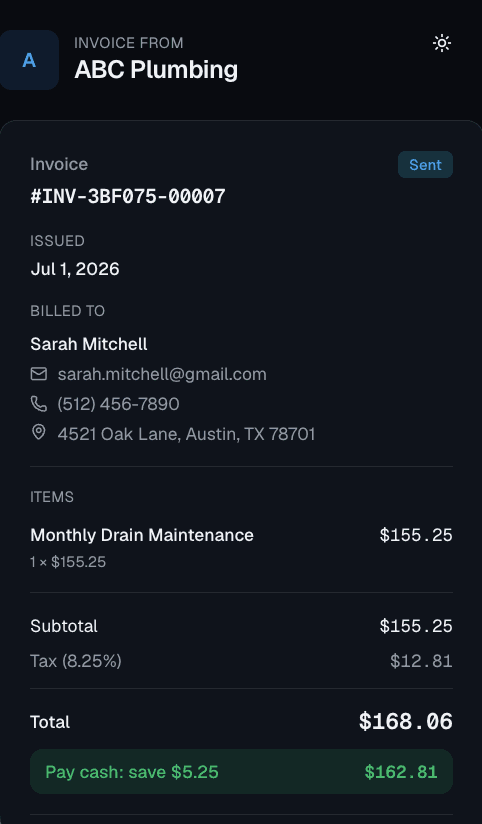
Customer pays by card — you get notified instantly
No credit card · Free forever
How TX2Pay works for handyman businesses
Invoice in 30 seconds from your phone
At the end of every job, open TX2Pay, enter the work and price, and send. Your customer gets a professional invoice with a pay-now button instantly.
Get paid on-site — every time
No more 'I'll send you a check.' Every invoice includes a secure card payment link. Most customers pay while you're still packing up.
Quick quotes for new customers
Before you start a job, send a professional quote so everyone agrees on the price. Converts to an invoice with one tap when the work is done.
Proposals that convert to invoices in one tap
Quote the job, get the customer's approval, then flip it to an invoice the second you finish. No re-entering anything — all the line items carry over automatically.
Automatic payment reminders — no awkward follow-ups
If a customer doesn't pay, TX2Pay sends professional reminder messages on your behalf. You stay focused on jobs while the reminders collect for you.
See every job at a glance: billed, paid, overdue
Your TX2Pay dashboard shows every invoice across all your customers. Know exactly what's been paid, what's outstanding, and what needs a follow-up — without digging through texts.
Everything included, completely free
No trial period. No credit card. Free forever.
Questions from handyman businesses
Can I invoice right from the customer's driveway?
Yes. TX2Pay is a mobile app. Create and send the invoice from your phone the second the job is done.
What if I have multiple small jobs in a day?
Each job gets its own invoice in TX2Pay. You can see all of them in your dashboard — paid, pending, or overdue — at a glance.
Is TX2Pay good for solo handymen?
It's built for exactly that. The free plan has everything a solo handyman needs — invoicing, payments, proposals, and a client list.
Can I add photos or notes to an invoice?
You can add detailed notes and descriptions to each line item on the invoice to describe exactly what work was performed.
Start invoicing like a pro — free
Join hundreds of handyman businesses already using TX2Pay. No credit card required. Set up in 5 minutes.
Create Your Account